Home / Service / Scan to BIM

Existing Conditions BIM Models

A Revit model of your building as it actually is today, built directly from 3D laser scan data. Walls, floors, structure, openings, and major building services captured exactly where they sit, not designed, not estimated. The deliverable is a verified digital record of the existing building, ready for your design team to take forward. Every large project is run directly by Michael Kiernan, GeoMaus’s founder, from first call to delivered model.
Typical projects: Existing commercial buildings, 50,000 sqft and above. Hotels, warehouses, distribution centres, and large commercial properties.
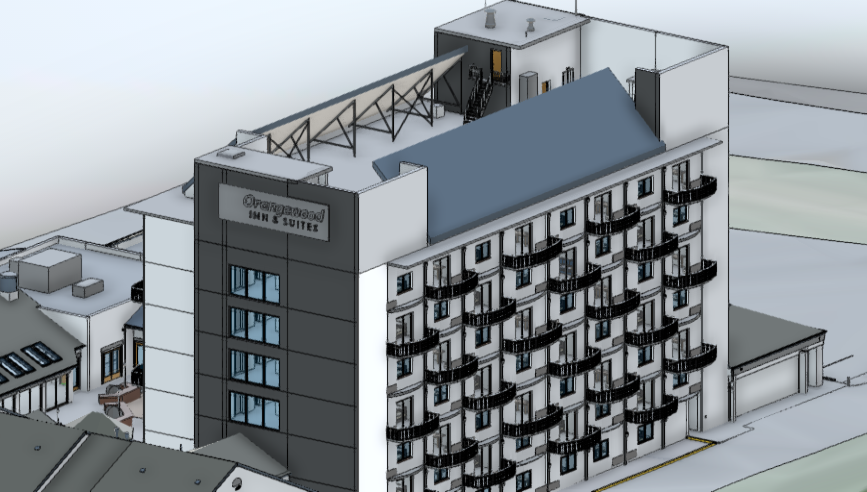
Orangewood Existing Conditions BIM - Scan to BIM services - Revit Model
Existing Conditions Models
Founder-Led Delivery
Native Revit Output

WHAT WE DELIVER

A Revit Record of Your Building As It Actually Is

Our Scan to BIM service turns raw 3D laser scan data into a Revit model of the existing building. Every wall, door, window, structural element, and major building services component is modelled directly from the point cloud as a native Revit element. The model reflects the building as it stands today, not how it was originally designed.

This is the working baseline your design team, facilities manager, or asset team takes forward. We’re upstream of design coordination, clash detection, and lifecycle modelling. We give you the verified existing conditions model. Your design team takes it from there.
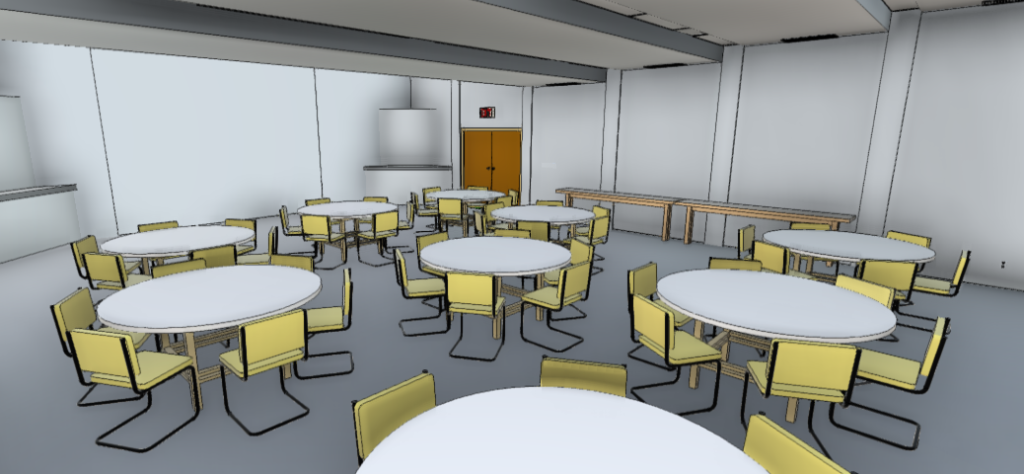
BIM Model - Scan to BIM services - Revit Model

HOW IT WORKS

Our Existing Conditions BIM Process

From point cloud to handover-ready Revit model, one point of contact the whole way.

On every Scan to BIM project, you’ll work directly with Michael Kiernan, GeoMaus’s founder, from first call to delivered model. No project coordinators relaying messages, no waiting for someone to check with someone else. When something changes or a deadline shifts, you’re speaking to the person who can make the call that day.

1
Scope and LOD brief
We’ll talk through your building, the LOD your downstream design team actually needs, your Revit standards, and which disciplines are in scope. You’ll have a written scope and a delivery date within 48 hours.
2
Site scan
Survey-grade laser scanning of the existing building, planned around your operations. Out of hours for retail and hospitality, around shift changes for warehouses. You’ll know exactly who’s onsite, when, and what they’re doing.
3
Registration and Modelling
Point cloud data is registered and modelled into native Revit elements directly from the scan. Walls, doors, structure, building services where in scope. Everything in the model is traceable to the point cloud underneath. Modelled in-house by our team.
4
QA and handover
Every model is validated against the point cloud and signed off by Michael personally before it leaves us. Delivered as RVT and IFC with the point cloud linked, plus a handover call so your design team can pick it up cleanly and start working into it the same day.

WHAT YOU RECEIVE

Scan to CAD Deliverables

Professional CAD drawings ready for building design, coordination, and archive.

Registered Point Cloud

The registered, cleaned point cloud in E57 and RCP formats, ready for use in Revit or other platforms. The raw material for all building point cloud to BIM conversion services.

Revit BIM Model (.RVT)

Fully parametric Revit model with native families, shared parameters, and correct classification for the building. Ready for scheduling and tagging. Our Revit models are built natively, not imported.

Clash Detection Report

Navisworks clash matrix with severity ratings, screenshots, and recommended resolutions per discipline for the building. Critical for building coordination.

COBie Data Drops

Structured asset data in COBie-compliant spreadsheets for the building. Facility-ready for CAFM integration and warranty tracking. Standard output for every building BIM information model.

2D Drawing Set

Auto-generated plans, sections, and elevations from the building BIM model. Annotated to BS 1192 standards.

QA & Assumptions Log

Signed model validation report with deviation analysis, assumptions register, and RICS compliance statement for the building.

COMMON USE CASES

When You Need An Existing BIM Model

Most Scan to BIM projects we’re called in on fall into one of these situations. If yours is on this list, you probably need a model before the next decision gets made.
Before a refurbishment, fit-out, or extension:

Your design team is about to redesign part of an existing building and the as-built information is missing, outdated, or unreliable. A verified existing conditions model gives them a working file they can design into directly, so the design isn’t a guess and the contractor doesn’t find surprises onsite.

When you’ve inherited a building with no current model:

You’re managing a building or portfolio that’s never been digitally documented to BIM standard. The existing conditions model becomes the foundational record for everything that comes next, design, refurbishment, facilities, valuation.

For portfolio documentation programmes:

You’re documenting multiple buildings to one consistent BIM standard. We deliver every model to the same family library and parameter structure, so your team and any incoming design consultants can switch between buildings without retraining.

As a permanent asset record for facilities and operations:

You want a verified digital record of the building that can carry asset information, maintenance references, and operational data forward. The existing conditions model becomes the long-term reference for facilities teams.

Before handing a project to multiple design consultants:

You’re about to bring in architects, structural engineers, or services consultants and want them all working from the same verified baseline of the existing building. A single existing conditions model means no consultant is working from a different version of reality.

Not sure if your project fits? Book a 30-minute call with Michael. If an existing conditions BIM model isn’t the right answer, he’ll tell you on the call.

COMMON QUESTIONS

Frequently Asked Questions

Everything you need to know about our point cloud to BIM workflow for buildings, deliverables, and standards.

Existing conditions only. We capture and model the building as it actually is today. The design work, clash detection, and coordination of new systems are done by your design team, working into the model we deliver. We’re upstream of design, not part of it.
LOD is agreed at the brief stage and matched to how the model will be used. Most existing conditions projects sit between LOD 200 and LOD 350. We won’t over-specify for its own sake. Your downstream design team will tell us what they need and we’ll deliver to that.
We work in the version your design team uses. Tell us at the brief stage and we’ll deliver in matching format.
Scan to CAD gives you 2D drawings derived from the point cloud. Scan to BIM gives you a 3D Revit model with parametric elements your design team can work into directly. Same source data, different deliverable. If you’re heading toward a Revit design workflow, you want the BIM model. If you only need drawings, CAD is enough.
Michael Kiernan, GeoMaus’s founder, runs every large project personally. You’ll have his direct line from the first call. The modelling is delivered by our team, but the planning, the quality control, and any decision that affects your programme are owned by Michael.

REQUEST A FREE QUOTE

Tell Michael About Your Project

Most enquiries get a same-day reply from Michael directly. If your project isn’t a fit for us, he’ll tell you on the call and point you somewhere better.

No sales calls, no automated drip sequences. Michael replies personally to every enquiry usually within a few hours.